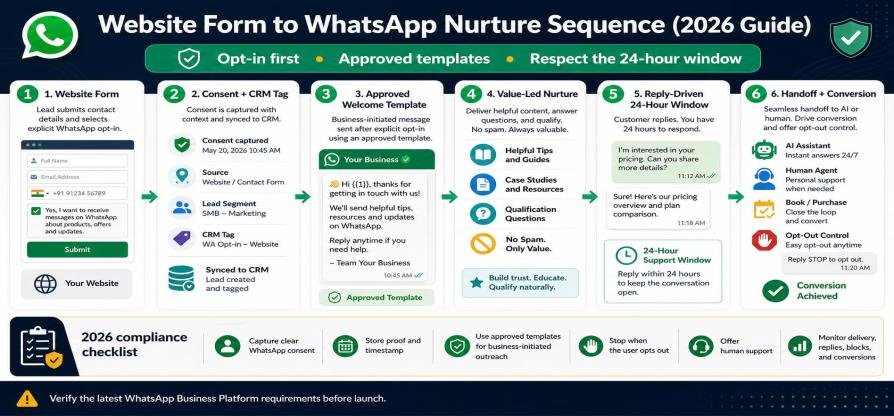
Website Form to WhatsApp Nurture Sequence (2026 Guide)
- 04 Oct, 2026
Website Form to WhatsApp Nurture Sequence (2026 Guide)
Email opt-ins are suffering from declining open rates, while WhatsApp boasts open rates exceeding 90% and response rates up to 45-60%. Converting website webform submissions directly into a structured, consent-compliant WhatsApp nurture sequence bridges the gap between lead capture and actual conversation.
Building an effective sequence requires more than sending a single welcome message. It demands strict opt-in compliance, automated API webhook integration, and an understanding of Meta's 24-hour service window rules.
                                  LEAD NURTURE ARCHITECTURE
                                              │
┌─────────────────────────┐      ┌────────────┴────────────┐      ┌─────────────────────────┐
│  1. Compliant Web Form  │ ───► │  2. Webhook / CRM Sync  │ ───► │ 3. Immediate WhatsApp   │
│  (Explicit Opt-in Check)│      │     (ovowpp.com Engine) │      │    Template Trigger     │
└─────────────────────────┘      └─────────────────────────┘      └─────────────────────────┘
                                                                               │
                                                                               ▼
┌─────────────────────────┐      ┌─────────────────────────┐      ┌─────────────────────────┐
│ 5. Session Window Open  │ ◄─── │ 4. User Replies to Msg  │ ◄─── │ 24h/72h Value Followup  │
│    (Free-Form Chat)     │      │   (Unlocks 24h Window)  │      │   (Utility Template)    │
└─────────────────────────┘      └─────────────────────────┘      └─────────────────────────┘
1. Compliance First: The 2-Step WhatsApp Opt-In Protocol
Sending automated WhatsApp messages without clear consent violates Meta’s Messaging Policy and local privacy laws (GDPR, TCPA). You must capture explicit consent at the point of form submission.
The Required Web Form Elements
Phone Number Input with Country Code: Use an international phone field formatting picker.
Unchecked Opt-in Checkbox: The box cannot be pre-checked.
Explicit Consent Text: State clearly what types of messages the user will receive.
<form id="lead-form">
  <label for="name">Full Namelabel>
  <input type="text" id="name" name="name" required placeholder="Jane Doe">

  <label for="phone">WhatsApp Phone Numberlabel>
  <input type="tel" id="phone" name="phone" required placeholder="+1 (555) 019-2834">

  <div class="consent-box">
    <input type="checkbox" id="wa_consent" name="wa_consent" required>
    <label for="wa_consent">
      I agree to receive project updates, resource links, and consultation follow-ups from [Company] via WhatsApp. Message & data rates may apply. Reply STOP anytime to unsubscribe.
    label>
  div>

  <button type="submit">Download Free Guidebutton>
form>
2. High-Converting 4-Step Nurture Blueprint
Instead of blasting promotional offers, structure your sequence to deliver immediate value, provoke a reply, and start a 2-way conversation.
       DAY 0                    DAY 1                    DAY 3                    DAY 5
 ┌───────────────┐        ┌───────────────┐        ┌───────────────┐        ┌───────────────┐
 │ Immediate     │        │ The Resource  │        │ Case Study /  │        │ Soft Call-to- │
 │ Deliverable   │ ─────► │ Check-in      │ ─────► │ Social Proof  │ ─────► │ Action (Offer)│
 │ (Template)    │        │ (Utility)     │        │ (Marketing)   │        │ (Interactive) │
 └───────────────┘        └───────────────┘        └───────────────┘        └───────────────┘
Step 1: Immediate Instant Deliverable (Day 0 - Within 60 Seconds)
Goal: Deliver requested asset while user intent is at peak level.
Message Type: Approved WhatsApp Utility Template.
Copy Example:
"Hi {{1}}, thank you for requesting the 2026 Growth Blueprint! Here is your direct download link: [ Link ]\n\nDid you have a specific goal in mind when downloading this today?"
Strategic Mechanism: Ending with an open question encourages a direct reply. When the user replies, Meta opens a 24-hour conversational session window, allowing free-form multi-turn messaging.
Step 2: The Resource Follow-Up (Day 1 - 24 Hours Later)
Goal: Check if they accessed the resource and provide additional context.
Copy Example:
"Hi {{1}}, quick check-in—were you able to open the guide? Page 4 covers the exact setup we used to double conversion rates. Let me know if you ran into any questions!"
Step 3: Social Proof & Case Study (Day 3)
Goal: Build trust by sharing a relevant client transformation or video breakdown.
Copy Example:
"Hey {{1}}, thought you might find this useful. Here is how [Client Name] reduced their response times from 4 hours to 30 seconds using automated WhatsApp routing: [ Link ]. Would a similar setup work for your team?"
Step 4: The Soft Closing Call-to-Action (Day 5)
Goal: Convert engaged leads into booked consultations or product demos.
Message Type: Template with Quick Reply Buttons.
Button Options:
[ 📅 Book 15-Min Call ]|[ 💬 Ask Question ]|[ Stop Nurture ]
3. Technical Implementation: Webhook Pipeline to CRM
To power this sequence, data must flow seamlessly from your site into your WhatsApp automation engine.
[ Webform Submission ] ──► [ Webhook POST Payload ] ──► [ ovowpp.com Automation Engine ]
                                                                   │
                                             ┌─────────────────────┴─────────────────────┐
                                             ▼                                           ▼
                                  [ Validate Consent = true ]                  [ Consent = false ]
                                             │                                           │
                                             ▼                                           ▼
                                [ Enroll in Nurture Flow ]                    [ Record Contact Only ]
Sample Webhook Data Payload
When a user submits your form, your frontend or backend triggers an API call to ovowpp.com:
{
  "api_key": "ovo_live_992018471029",
  "action": "enroll_nurture_sequence",
  "lead": {
    "first_name": "Jane",
    "phone_number": "+15550192834",
    "email": "jane@example.com",
    "opt_in_timestamp": "2026-10-03T18:50:00Z",
    "consent_given": true,
    "lead_source": "Homepage Download Form"
  },
  "sequence_id": "seq_whatsapp_nurture_v1"
}
4. Key Session Window Rules You Must Follow
When orchestrating a multi-day nurture sequence on the official WhatsApp Business API, you must account for Meta's messaging rules:
The 24-Hour Service Window: When a lead submits a form, they have not yet messaged your WhatsApp number directly. Your first outbound message must be a pre-approved Message Template.
Re-Opening the Window: Each time the customer sends a reply, the 24-hour service window resets. During this window, you can send dynamic, automated, or human messages without template restrictions.
Out-of-Window Follow-ups: Steps 2, 3, and 4 in your sequence (sent days later) must use approved Utility or Marketing Templates if the user hasn't messaged within the last 24 hours.
5. Setting Up Nurture Sequences in ovowpp.com
Building high-converting post-form nurture sequences is simple with ovowpp.com:
Native Webhook Generator: Create custom form endpoints in 1 click and connect them to Elementor, Webflow, Typeform, or custom sites.
Visual Sequence Builder: Map out delays (e.g., Wait 24 Hours), condition splits (e.g., If Lead Replied -> Jump to Human Inbox), and automated template triggers.
Automatic Unsubscribe Management: Automatically handle
STOPor opt-out requests to ensure continuous account compliance and high sender reputation.Unified CRM Dashboard: Track form-to-WhatsApp conversion rates, message delivery rates, and agent handoffs from a single platform.
Share this Blog
More Blogs

Secure Your Cloud-Based Applications in 2026: The Essential Guide to SaaS Penetration Testing
Secure Your Cloud-Based Applications in 2026: The Essential Guide to SaaS Penetration TestingAs Soft...
- 05 Oct, 2026

Why Every Business Needs a WhatsApp Campaign Manager
Why Every Business Needs a WhatsApp Campaign ManagerIn today’s fast-paced digital marketplace, winni...
- 05 Oct, 2026

5 Powerful Ways to Automate Your Marketing with OvoWpp
5 Powerful Ways to Automate Your Marketing with OvoWppTraditional digital channels are facing unprec...
- 05 Oct, 2026

How WhatsApp CRM Tools Can Skyrocket Your Customer Engagement
How WhatsApp CRM Tools Can Skyrocket Your Customer EngagementIn an era where cold emails sit unopene...
- 05 Oct, 2026
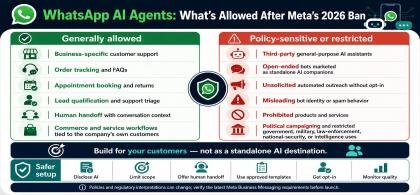
WhatsApp AI Agents: What’s Allowed After Meta’s 2026 Ban
WhatsApp AI Agents: What’s Allowed After Meta’s 2026 BanMeta's updated WhatsApp Business Solution Te...
- 04 Oct, 2026
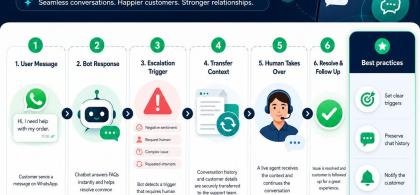
WhatsApp Chatbot to Human Handoff: Setup Guide (2026)
WhatsApp Chatbot to Human Handoff: Setup Guide (2026)A chatbot that gets stuck in an infinite loop o...
- 04 Oct, 2026
5 Smart Ways to Automate WhatsApp Marketing Without Sounding Spammy
5 Smart Ways to Automate WhatsApp Marketing Without Sounding Spammy Stop alienating your aud...
- 08 Aug, 2026
Launch a WhatsApp SaaS Business with a Platform Built for Growth
Launch a WhatsApp SaaS Business with a Platform Built for Growth Discover...
- 08 Aug, 2026
WhatsApp for E-commerce: How to Recover Abandoned Carts and Increase Sales
WhatsApp for E-commerce: How to Recover Abandoned Carts and Increase Sales...
- 08 Aug, 2026
Unified WhatsApp Inbox: The Feature That Fixes Team Chaos
Unified WhatsApp Inbox: The Feature That Fixes Team Chaos Stop losing context...
- 08 Aug, 2026
Why Digital Agencies Need WhatsApp Automation to Scale Client Results
Why Digital Agencies Need WhatsApp Automation to Scale Client Results Stop le...
- 08 Aug, 2026
Stop Losing Leads in WhatsApp Chats: The Complete WhatsApp CRM Solution for Sales Teams
The Ultimate Guide to Scaling WhatsApp Sales: Why Your Business Needs a System, Not Just a Phone...
- 08 Aug, 2026

Top Benefits of Using OvoWpp for Agencies and Startups
Top Benefits of Using OvoWpp for Agencies and StartupsIn today’s hyper-competitive market, agencies...
- 01 Jun, 2025

From Contact to Customer, The WhatsApp Sales Funnel Explained
From Contact to Customer, The WhatsApp Sales Funnel ExplainedWhatsApp is no longer just a messagin...
- 01 Jun, 2025

Boost Conversions with WhatsApp Short Links and Smart Widgets
Boost Conversions with WhatsApp Short Links and Smart WidgetsIn the competitive world of digital ma...
- 08 Feb, 2025

WhatsApp Business API vs WhatsApp Business App: Which Does Your Marketing Team Need?
WhatsApp Business API vs WhatsApp Business App: Which Does Your Marketing Team Need?Marketing teams...
- 08 Feb, 2025

How to Build a WhatsApp Chatbot for Lead Generation (No Code)
How to Build a WhatsApp Chatbot for Lead Generation (No Code)Leads who click an ad, scan a QR code,...
- 06 Feb, 2025

Best WhatsApp CRM for Small Business: How to Choose (and What Actually Matters)
Best WhatsApp CRM for Small Business: How to Choose (and What Actually Matters)If you run a small bu...
- 06 Feb, 2025